
Barrel & Container Shipping Software
Run your barrel and container shipping business from one platform
No more digging through messages. Bookings, invoices and shipments, organized in one place.
No credit card required. Setup takes less than 10 minutes.
See how it works ↓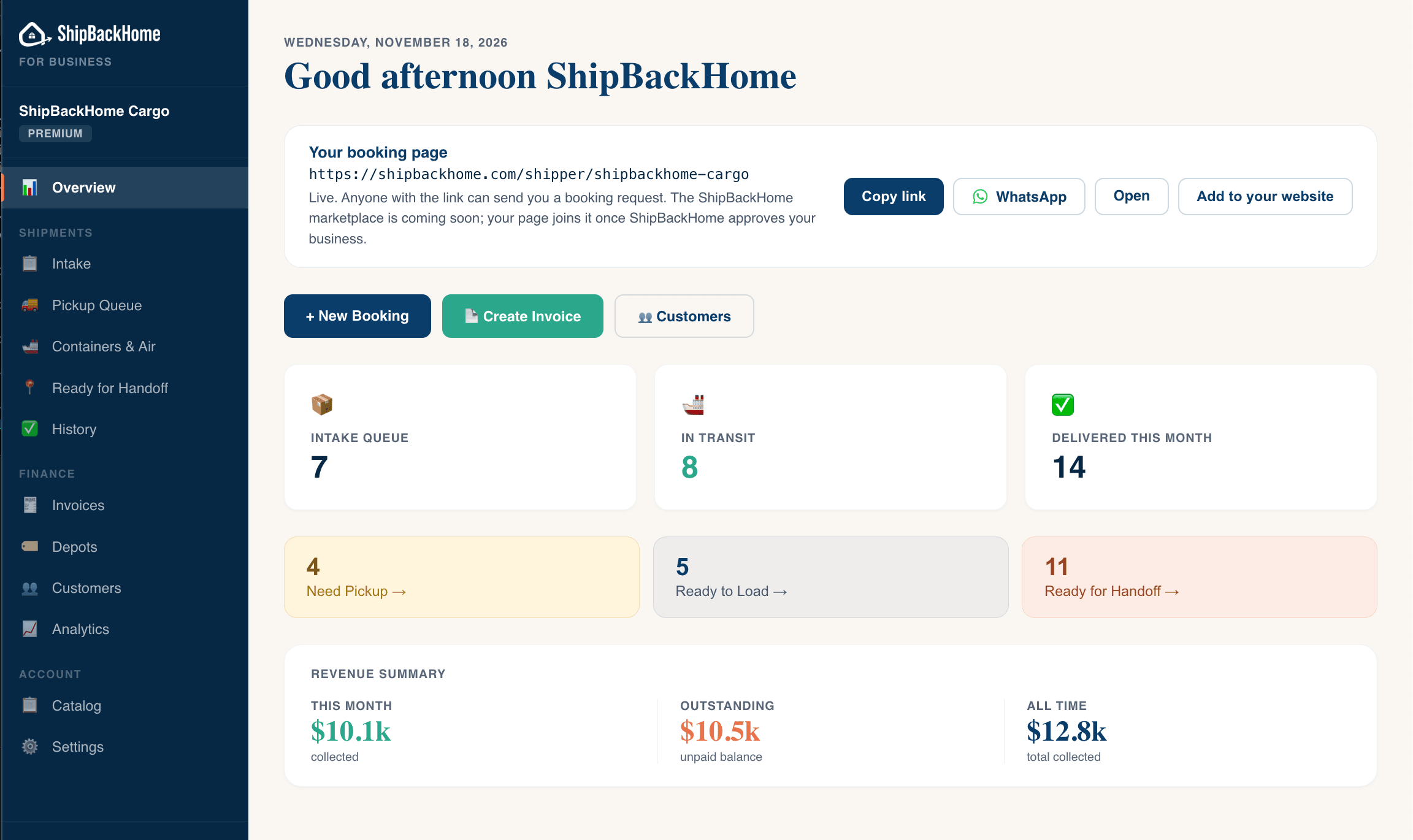
- $130,000+invoiced
- 280+bookings
- 3,500+items shipped
Through ShipBackHome since May 2026
From booking to delivery, in one place
Set up
Add where you ship, your prices and your customers.
Take bookings
Share your booking link, or add bookings yourself.
Get paid
Send invoices, record payments and take cards.
Ship & track
Load containers. Customers track with their code.
Setup takes less than 10 minutes.
Less WhatsApp, less chasing payments
Stop digging through WhatsApp for booking details.
Each booking keeps the customer’s contact details, items, destination and drop-off or pickup choice in one place, instead of scattered across WhatsApp chats.
Stop chasing payments.
Invoices and payments sit with each booking, including the cash and Zelle you record yourself, so you can see who still owes what. On Pro, customers with an overdue invoice get a reminder email.
Keep customers updated without answering every message.
Customers get an email as you move their shipment along, and can track it with their booking code instead of asking you on WhatsApp.
More tools in ShipBackHome
- FreeContainers and air shipments, with a printable Packing List
- FreeImport customers and invoices from QuickBooks, InvoiceASAP, Square or CSV, and export to CSV
- Pro planUnlimited bookings and invoices, team members and payment reminders
- Pro planScan Invoice: turn a photo or WhatsApp screenshot into an invoice
- Premium planContainer fill bar and automatic container tracking
- Premium planRevenue analytics, depot and commission tracking, and an AI assistant
No credit card required.
Real shippers, real routes.
“I’ve been shipping containers since 2009, and the hardest part was never the shipping. It was chasing customers for payment and keeping every container organized between Cap-Haïtien and Port-au-Prince. ShipBackHome solved both. Customers get automatic payment reminders, every payment is recorded without digging through WhatsApp, and my team in Haiti can see each booking organized by container.”
 Sony RaymondOwner, Value Service InternationalTampa, FL
Free to start. Upgrade when you're ready.
Small platform fee only on payments processed through ShipBackHome. Cash and Zelle collected directly are always free.
Everything you need to start: bookings, invoicing, and customer management.
- Up to 25 bookings & 25 invoices/month
- Up to 3 routes
- Invoicing & payments
- Customer list
- Schedule management
- Email notifications
- Split payments
- Logo upload
- Packing List documents
- CSV exports
Unlimited bookings and the tools to run day-to-day operations.
- Everything in Free, plus:
- Unlimited bookings & invoices
- Up to 10 routes
- 5 team members
- Bulk updates & notifications
- Customer CRM & tags
- Payment reminders
- Scan Invoice — photo or WhatsApp screenshot
Full automation and analytics for growing shipping businesses.
- Everything in Pro, plus:
- Unlimited routes
- 10 team members
- Container fill bar
- Automatic container tracking
- Revenue analytics
- AI assistant for bookings & invoices
- Depot & commission tracking
- Scan to Load — camera scan, no barcode scanner
- SMS shipment updates — coming soon
All plans include Stripe payment processing. Platform fee is charged only on payments processed through ShipBackHome. Cash and Zelle payments you collect directly have no fee.
Questions shippers ask
Is this for shipping businesses or people sending a shipment?
Shipping businesses. ShipBackHome for Business is software for companies that ship barrels, boxes and cargo by air or ocean. It does not ship anything itself. If you want to send something, find a shipper at shipbackhome.com.
What is included for free, and when would I need to upgrade?
The Free plan includes your booking page, up to 25 bookings and 25 invoices a month, up to 3 routes, invoicing, payments and your customer list. Past 25 bookings in a month, new requests still arrive but stay locked (you can see one came in, not who sent it) until you upgrade; new invoices pause until the next month. Pro ($59 a month) removes those limits and adds team members, payment reminders and more. Premium ($129 a month) adds container tracking, analytics and the AI assistant. Card payments processed through ShipBackHome carry a platform fee: 4.9% + 30¢ on Free, 3.5% + 30¢ on Pro and Premium.
Do my customers need an account to request a booking?
No. Customers open your link and send a booking request with their contact details. No account or password is needed. They can track their shipment later with their booking code.
Can I keep recording cash and Zelle payments?
Yes. Record cash, Zelle, CashApp, checks and other payments against an invoice. There is no platform fee on payments you collect yourself. Card payments through your invoice link need a connected Stripe account.
What happens after I create an account?
You land on your dashboard with a short setup checklist. Add your business details, contact information, location, destinations and services, and your booking page turns on. Then copy your link or share it on WhatsApp. The ShipBackHome marketplace, where customers can search for shippers, is not open yet, so customers find your page through the link you share.
Can I bring my existing customers and invoices?
Yes. Import from InvoiceASAP, QuickBooks, Square or any CSV file, and export to CSV at any time, on every plan. Switching from another tool? Compare →
Prefer to talk it through? Book a 30-minute demo
Guides for shippers
Run your shipping business in one place.
Bookings, invoices, payments and containers together, instead of spread across WhatsApp chats, paper and spreadsheets.
Sign up freeNo credit card required. Setup takes less than 10 minutes.